

Agent Ops in the Real World
How you should run AI Agents in Production


Hey there 👋,
Welcome to the detailed blog on AgentOps.
Everyone talks about building “AI agents”.
But how are they operated and managed at scale?
Once an agent leaves the notebook and starts answering real customer questions, you stop thinking in terms of “prompts” and start thinking in terms of:
SLOs and incident runbooks
Scaling, caching, rate limits and cost controls
Secrets, IAM, and data access
Cross-account networking
Rollbacks and safe experiments
In this post, we want to walk through how a real customer-facing AI agent runs in production, and how we think about Agent Ops: the operational stack and practices behind a stateful, LLM-powered service.
We will use concrete components (ECS, Redis, OpenSearch, Postgres, DynamoDB, Datadog, Opik, etc.), but the principles carry over to any modern stack.
What I Mean by “Agent Ops”
When I say Agent Ops, I don’t mean “how to write a better system prompt”.
For me, Agent Ops is everything that happens after you have got a working prototype:
How you deploy, monitor, debug, scale, secure, and iterate on an AI agent that lives inside your production environment.
It sits on top of traditional MLOps / DevOps, but with some extra complexity:
Agents are stateful (conversations, tools, retrieval).
They depend on external LLM APIs and observability systems.
Their behavior is driven not only by code, but also by prompts, configs, and tool wiring.
They often run RAG pipelines and multi-step workflows that can fail in many places.
So let’s look at what this actually looks like for a real customer facing agentic workflow.
High-Level Architecture: The Agent’s “Ops Skeleton”
At a high level, the agent looks like this:
A FastAPI (or similar) application running on EC2 instances or ECS in private subnets
Fronted by an Application Load Balancer (ALB, HTTPS only)
Using:
Redis (ElastiCache) for caching
Postgres (RDS) / OpenSearch as a shared vector DB + application state
DynamoDB for chat history and session memory
S3 + Athena + Glue + KMS for analytics and data integrations
Integrated with:
Opik (or similar) for tracing, evaluations and prompt/config management
Internal systems/data pipelines via SNS / SQS / EventBridge or an event bus
Model APIs from model providers like OpenAI or Anthropic or Bedrock or orq.ai
During experimentation and in production you often need fallback, orq.ai Router really helps you here.
It is one API endpoint.
300+ models across OpenAI, Anthropic, Google, AWS.
Built-in retries, fallbacks, and caching.
And it's free to get started.
No minimum spend.Link - Check here
Back: You would have two main environments (could be extended):
Dev (lower autoscaling limits, used for tests and experiments)
Production (higher capacity, stricter SLOs and alerts)
Each environment has its own Postgres, DynamoDB tables and Redis, with separate networking.
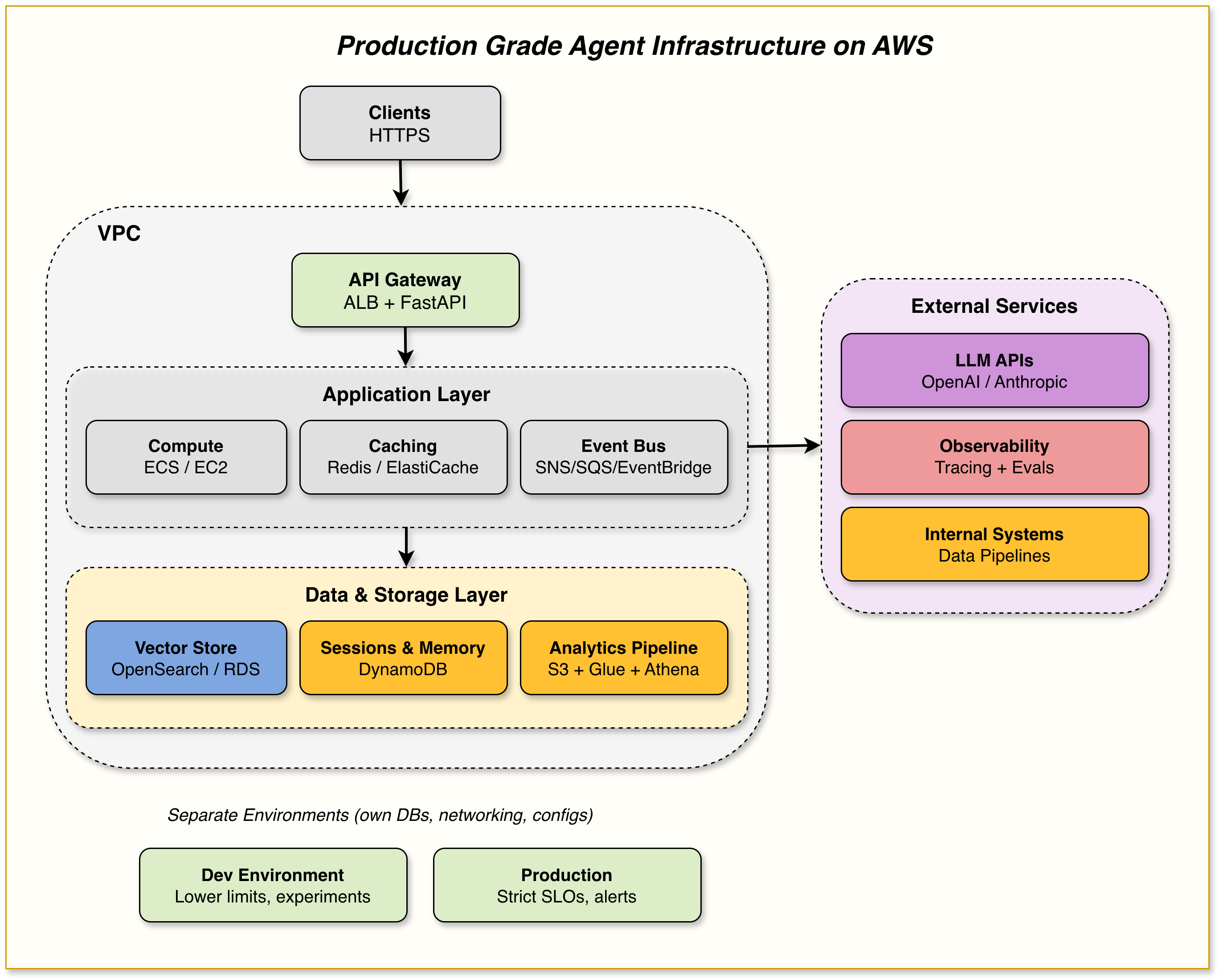
Now let’s zoom into the individual components from an Agent Ops point of view.
Important Announcements:
Announcement 1:
On 22nd March, premium subscribers will have a monthly call at 16:00 CET to discuss the topic in this blog further and ask questions.
Zoom meeting invites will follow. 🙂
Now, we walk through each block of Agent Ops discussed above in more detail: